Worldwide mix IP proxies
Worldmix: private IPv4 from around the world in one pool.
Worldwide proxy plans
Every plan includes IPv4 and SOCKS5 together.
Threads are simultaneous connections. The more threads, the higher the parallel load your software can handle.

Pool of 12,000-15,000 IPs
Address rotation
Unlimited traffic
Up to 1,000 threads

Pool of 12,000-15,000 IPs
Address rotation
Unlimited traffic
Up to 1,000 threads

Pool of 12,000-15,000 IPs
Address rotation
Unlimited traffic
Up to 1,000 threads

Pool of 12,000-15,000 IPs
Address rotation
Unlimited traffic
Up to 1,000 threads
Pool of 12,000-15,000 IPs
Address rotation
Unlimited traffic
Up to 3,000 threads
Pool of 12,000-15,000 IPs
Address rotation
Unlimited traffic
Up to 3,000 threads
Pool of 12,000-15,000 IPs
Address rotation
Unlimited traffic
Up to 3,000 threads
Pool of 12,000-15,000 IPs
Address rotation
Unlimited traffic
Up to 3,000 threads
Proxy catalog for your task
What is mix IP
Mix IP is a set of addresses from many countries with no tie to a single region. The term is used in two cases. Account sellers write "mix IP" when profiles were registered from addresses in different countries. Proxy sellers use it for packages with addresses collected from all over the world.
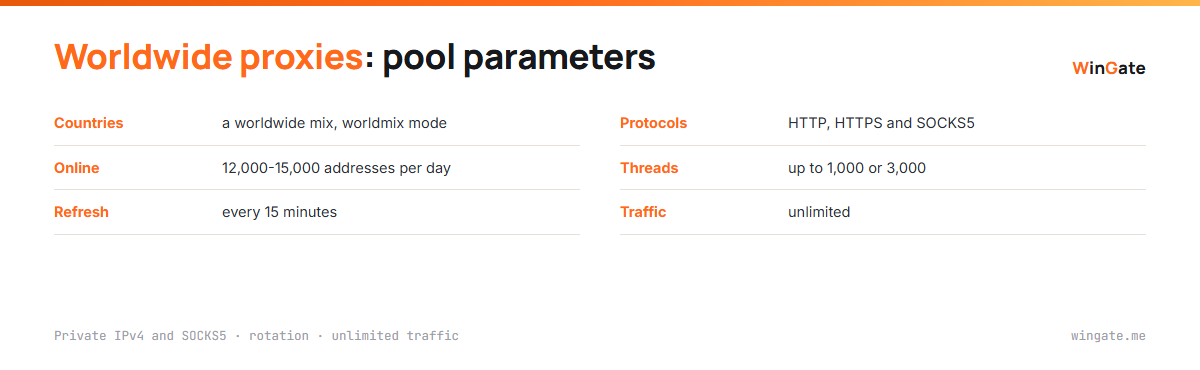
The whole WinGate pool works this way, in worldmix mode. The list holds 12,000-15,000 private IPv4 addresses online per day from mixed countries, and it refreshes every 15 minutes. HTTP, HTTPS and SOCKS5 come with every plan.
Proxies from different countries: the benefits
Addresses from different countries also come from different networks. Requests from your software spread across many ranges, and the target site never sees a row of neighboring IPs from one subnet that is easy to block in one go.
For high-volume work this pays off directly. A scraper that crawls a catalog from hundreds of addresses in different parts of the world looks like many different visitors. The per-address limit fills slowly, and captchas show up far less often.
The second benefit concerns sign-ups and profile networks. Accounts created from addresses in different countries do not cluster by geography or range, which is exactly why mix IP shows up so often in descriptions of ready-made accounts.
Worldwide proxies for scraping and accounts
- Web scraping of sites and marketplaces where request frequency per address matters
- Registering and running account networks for multi-accounting
- Checking that resources are reachable from different parts of the world
- Checker and SEO software runs on long lists
The pool runs in worldmix mode, so you cannot select a single country. The quickest way to see whether the mix fits your scenario is the free test, up to 2 hours.
How worldwide mix proxies work
The proxy list updates constantly. It changes every 15 minutes, and you can grab the current version as a link or a file from the dashboard. Software that reloads the link on a schedule keeps working with fresh addresses without stopping the job.
| Countries | a worldwide mix, worldmix mode |
|---|---|
| Online | 12,000-15,000 addresses per day |
| List refresh | every 15 minutes |
| Protocols | HTTP, HTTPS and SOCKS5 |
| Threads | up to 1,000 or 3,000 depending on the plan |
| Traffic | unlimited |
| Format | IP:PORT with binding, or IP:PORT:LOGIN:PASS |
Any IP lookup service shows the country of a given address. Anti-detect browsers detect it on their own and adjust the profile time zone.
Proxy servers in different countries: how to find the country
The country mix shifts with every 15-minute refresh, so check it on a fresh export. Most proxy checkers show a country for each address, and after one run you can see how the list spreads across the world.
In an anti-detect browser the country appears when you check the proxy in the profile card. The same screen shows the time zone the browser will set for that address, and the check takes a couple of seconds.
For jobs where request frequency matters, geography is secondary. What matters is that requests are spread across thousands of addresses from different networks, and that works with whatever countries are in a given export.
How to set up worldwide proxies
In the dashboard settings, bind the IP of the server or computer running your software, up to 2 addresses, and change them any time. Then load the list into your program: the main format is IP:PORT, and IP:PORT:LOGIN:PASS is for programs with login and password fields.
Your software switches the address from one request to the next. For bulk collection it takes the next address on every request. For logged-in work, an account keeps one address for the whole session.
How to buy worldwide proxies
Sign up in the dashboard, request the free test of up to 2 hours, bind your IP and open a ticket with the operator. After the test, pick the term and the thread count.
Payment is in cryptocurrency, and access activates automatically right after the transaction.
FAQ
Can I pick a specific country?
There is no country selection: the whole pool runs in worldmix mode. That is what mix IP means: addresses from many countries in one list.
How do mix IP proxies relate to rotating proxies?
It is the same pool. Mix IP describes where the addresses come from. Rotation describes the list refresh every 15 minutes and the address switching in your software.
How do I know which country a proxy is from?
Use any IP lookup service. An anti-detect browser detects the country itself when it checks the proxy in the profile card.
Do the countries in the list change?
Yes. The list refreshes every 15 minutes, and the set of countries in the export changes along with the addresses.
See also: rotating proxies, bulk proxies, private proxies, IPv4 proxies, SOCKS5 proxies, full catalog
© WinGate · source of the material · wingate.me/en/proxy/worldwide-proxies