SOCKS5 proxies
Private SOCKS5 proxies with TCP and UDP support.
SOCKS5 proxy plans
Every plan includes both IPv4 and SOCKS5.
Threads are simultaneous connections. The more threads, the higher the parallel load your software can handle.

Pool of 12,000-15,000 IPs
Address rotation
Unlimited traffic
Up to 1,000 threads

Pool of 12,000-15,000 IPs
Address rotation
Unlimited traffic
Up to 1,000 threads

Pool of 12,000-15,000 IPs
Address rotation
Unlimited traffic
Up to 1,000 threads

Pool of 12,000-15,000 IPs
Address rotation
Unlimited traffic
Up to 1,000 threads
Pool of 12,000-15,000 IPs
Address rotation
Unlimited traffic
Up to 3,000 threads
Pool of 12,000-15,000 IPs
Address rotation
Unlimited traffic
Up to 3,000 threads
Pool of 12,000-15,000 IPs
Address rotation
Unlimited traffic
Up to 3,000 threads
Pool of 12,000-15,000 IPs
Address rotation
Unlimited traffic
Up to 3,000 threads
Proxy catalog for your task
Why you need SOCKS5 proxies
SOCKS5 is a universal transport-level protocol that passes different traffic types and does not interfere with the data. It is handy for software and non-standard connections where plain HTTP is not enough.
SOCKS5 does not look at the data passing through it and simply forwards the connection, so mail clients, messengers and any software that works over sockets run through it. HTTP proxies understand web traffic and nothing else, which is why automation setups usually settle on SOCKS5.
Features of SOCKS5 proxies
SOCKS5 works at the transport level and carries any TCP traffic beyond the web: Telegram, games, torrents, mail clients, SSH and curl. So it is used where an HTTP proxy will not do.
The pool gives you private IPv4 over SOCKS-4 or SOCKS-5, as IP:PORT bound to your IP or as IP:PORT:LOGIN:PASS. With the socks5h scheme, the proxy resolves hostnames, so DNS queries never go through your own connection.
What to look for in SOCKS5 proxies
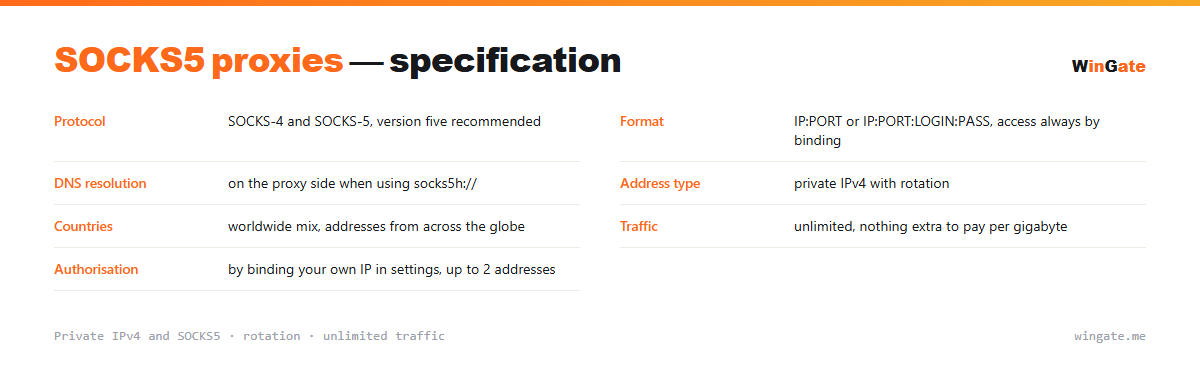
| Protocol | SOCKS-4 and SOCKS-5, SOCKS-5 recommended |
|---|---|
| Format | IP:PORT or IP:PORT:LOGIN:PASS, access via IP binding only |
| DNS resolution | on the proxy side when using socks5h:// |
| Address type | private IPv4 with rotation |
| Countries | worldwide mix of countries |
| Traffic | unlimited |
| Authorization | by binding your own IP in settings, up to 2 addresses |
How SOCKS5 proxies differ from HTTP
The difference is at the protocol level. An HTTP proxy reads the requests themselves, can attach its own service headers and only handles web traffic. SOCKS5 works one level lower, at the transport layer: it never looks inside and just passes bytes between you and the destination. That is why it is so versatile and leaves no extra traces in the request.
One detail gets overlooked more than any other: there are two ways to write the address. With socks5:// the hostname is resolved on your machine, so the DNS query never touches the proxy and stays visible to your own provider. With socks5h:// the proxy resolves the name, and nothing leaks through your own connection. If you need to keep the domains you visit private, use the second form.
The package includes both protocol versions, SOCKS-4 and SOCKS-5, and SOCKS-5 is the one to use: SOCKS-4 supports neither login and password authentication, nor IPv6, nor UDP. If your software handles HTTP and SOCKS5 alike, you will not notice a speed difference between them, though SOCKS5 wins on compatibility.
On the software side the setup comes down to three fields: address, port and, where the format carries them, a login and password. In browser profiles and antidetect browsers you pick the connection type from a list, and the same screen usually has a checkbox for resolving names on the proxy side. Where there is no such checkbox and domains must not leak, route the connection through a local client that supports socks5h.
- socks5h:// resolves hostnames on the proxy side, socks5:// on yours
- SOCKS adds no service headers, unlike some HTTP proxies
- SOCKS-4 cannot do login and password authentication
- Any TCP traffic passes through SOCKS5
How to set up SOCKS5 proxies
Access works by binding your IP in the dashboard (up to 2 addresses); without that, the proxies will not work in any format. SOCKS5 is set in the application or system settings: SOCKS5 type, address and port. Suitable for browsers, antidetect browsers, Telegram, SSH and curl.
For software that needs login and password fields, there is an additional IP:PORT:LOGIN:PASS format. SOCKS5 compatibility with your application is easy to check on the free test.
How to buy SOCKS5 proxies
The process is simple. Sign up in the dashboard, request a free test of up to 2 hours, bind your IP and open a ticket with an operator to see how the proxies work on your own tasks.
If everything works, choose a package by volume and term, pay in crypto, and access opens right after payment. You get one free test before you buy, and support replies in tickets.
FAQ
How does SOCKS5 differ from HTTP?
SOCKS5 works at the connection level and passes different traffic types, while HTTP is tailored to web requests. Both work on the same address, and the test is the easiest way to see it.
Do I need a login and password?
Access is granted by binding your IP in the dashboard, up to 2 addresses. Login and password is just an extra format for software that has those fields. Both methods can be checked on the free test before purchase.
Can I choose the address country?
You get a rotating pool of private IPv4 from networks around the world. The free test shows whether this fits your task.
See also: IPv4 proxies, HTTP/HTTPS proxies, buy proxies for A-Parser, buy proxies for Screaming Frog, buy proxies for Netpeak Spider, buy proxies for Key Collector, buy proxies for Dolphin Anty, buy proxies for AdsPower, full catalog
© WinGate · source of the material · wingate.me/en/proxy/socks5-proxy