Proxies for Netpeak Spider
A pool of private IPv4 for Netpeak Spider.
Proxy plans for Netpeak Spider
Every plan includes both IPv4 and SOCKS5.
Threads are simultaneous connections. The more threads, the higher the parallel load your software can handle.

Pool of 12,000-15,000 IPs
Address rotation
Unlimited traffic
Up to 1,000 threads

Pool of 12,000-15,000 IPs
Address rotation
Unlimited traffic
Up to 1,000 threads

Pool of 12,000-15,000 IPs
Address rotation
Unlimited traffic
Up to 1,000 threads

Pool of 12,000-15,000 IPs
Address rotation
Unlimited traffic
Up to 1,000 threads
Pool of 12,000-15,000 IPs
Address rotation
Unlimited traffic
Up to 3,000 threads
Pool of 12,000-15,000 IPs
Address rotation
Unlimited traffic
Up to 3,000 threads
Pool of 12,000-15,000 IPs
Address rotation
Unlimited traffic
Up to 3,000 threads
Pool of 12,000-15,000 IPs
Address rotation
Unlimited traffic
Up to 3,000 threads
Proxy catalog for your task
Why Netpeak Spider needs proxies
Netpeak Spider scans a site and finds technical optimization errors. On large sites and frequent scans, requests from one IP hit limits and the audit slows down.
Crawling a site means a dense stream of requests to one domain, and sooner or later it tests the patience of the server on the other end. A proxy keeps the crawl from looking like a flood of requests from a single source, which matters most on large projects.
Features of proxies for Netpeak Spider
Netpeak Spider and Checker crawl thousands of URLs during site audits and data collection, and from one IP a large crawl runs into limits and captchas. A rotating pool spreads requests across addresses.
You get private IPv4 over HTTP, HTTPS or SOCKS5, as IP:PORT bound to your IP or as IP:PORT:LOGIN:PASS. Crawl threads are spread across IPs, so the requests to one domain never all come from a single address.
What proxies you need for Netpeak Spider
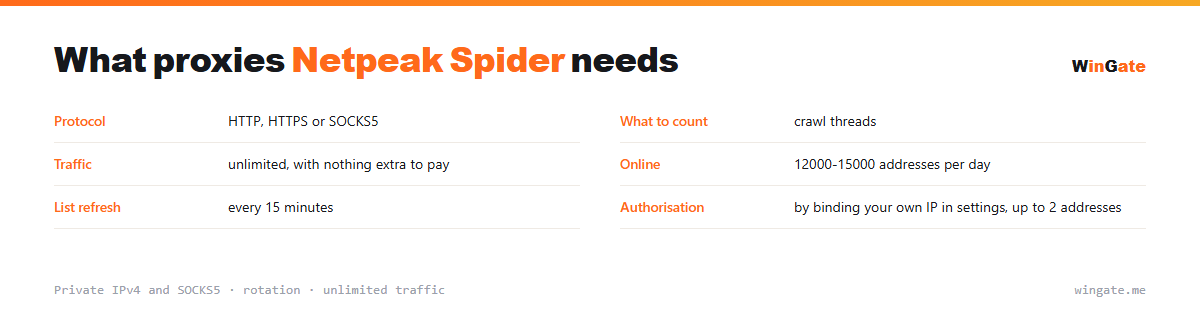
| Protocol | HTTP, HTTPS or SOCKS5 |
|---|---|
| What to count | crawl threads |
| Traffic | unlimited |
| Online | 12,000-15,000 IPs online daily |
| List refresh | every 15 minutes |
| Authorization | by binding your own IP in settings, up to 2 addresses |
How many proxies Netpeak Spider needs for a crawl
A crawler moves as fast as its settings allow, and on large projects that means dozens of requests per second to one domain. From a single address, that many requests eventually hit a server-side limit, and the crawl either breaks off halfway or starts returning empty responses.
So threads are spread across IPs: take as many addresses as there are concurrent threads in the program settings, plus some spare. The thread limit comes with the package and does not stack across packages, so a large project means a larger package.
Traffic is worth a thought too, since a crawl pulls full pages with their markup and the volume adds up quickly. Here it is unmetered: nothing is charged per gigabyte, and the only limit is the number of threads. Related techniques are on the page about data collection.
- Dense crawling runs into server limits
- The number of addresses follows the thread setting in the program
- Traffic is unmetered; the only limit is threads
How to connect proxies in Netpeak Spider
To start, bind your IP in the settings, meaning the server or home computer where your proxy software runs. Without it, there is no connection. Two formats are available: the standard IP:PORT and IP:PORT:LOGIN:PASS for software with login and password fields.
In Netpeak Spider and Checker, proxies are added in the settings (Proxy section) as a list in IP:PORT format, HTTP or SOCKS5, and used while crawling URLs.
Check the setup before a large crawl. The free test shows how many addresses you need for your URL volume.
How to buy proxies for Netpeak Spider
The process is simple. Sign up in the dashboard, request a free test of up to 2 hours, bind your IP and open a ticket with an operator to check the setup with Netpeak Spider on your own tasks.
If everything works, choose a package by thread count and term, pay in crypto, and access opens right after payment. One free test is available before purchase. For setup questions, open a ticket with support.
FAQ
Will these proxies work with Netpeak Spider?
Netpeak Spider accepts proxies as a list, with HTTP supported. The free test lets you check which addresses from the pool suit your crawl.
Are there enough addresses for a big audit?
The pool of 12,000-15,000 IPv4 with rotation provides new addresses for frequent scans; the number of threads depends on the package.
How often should I rotate addresses?
It is easy to keep the list topped up from the pool, since the addresses refresh every 15 minutes. The test shows how your audit will run.
See also: proxies for A-Parser, proxies for Screaming Frog, proxies for Key Collector, proxies for scraping, proxies for price monitoring, proxies for SEO, SOCKS5 proxies, proxies for checkers, full catalog
© WinGate · source of the material · wingate.me/en/proxy/netpeak-proxy