Proxies for AdsPower
A pool of private IPv4 and SOCKS5 for AdsPower profiles.
Proxy plans for AdsPower
Every plan includes both IPv4 and SOCKS5.
Threads are simultaneous connections. The more threads, the higher the parallel load your software can handle.

Pool of 12,000-15,000 IPs
Address rotation
Unlimited traffic
Up to 1,000 threads

Pool of 12,000-15,000 IPs
Address rotation
Unlimited traffic
Up to 1,000 threads

Pool of 12,000-15,000 IPs
Address rotation
Unlimited traffic
Up to 1,000 threads

Pool of 12,000-15,000 IPs
Address rotation
Unlimited traffic
Up to 1,000 threads
Pool of 12,000-15,000 IPs
Address rotation
Unlimited traffic
Up to 3,000 threads
Pool of 12,000-15,000 IPs
Address rotation
Unlimited traffic
Up to 3,000 threads
Pool of 12,000-15,000 IPs
Address rotation
Unlimited traffic
Up to 3,000 threads
Pool of 12,000-15,000 IPs
Address rotation
Unlimited traffic
Up to 3,000 threads
Proxy catalog for your task
Why AdsPower needs proxies
AdsPower is an antidetect browser for working with many profiles in parallel, each with its own fingerprints, cookies and network settings. Without separate addresses, all profiles connect from one IP, and platforms link them together.
Profiles here are created in batches for e-commerce and ad accounts, and you need just as many addresses. The pool covers that, and the built-in check lets you drop a bad address before you log in to an account in the profile.
Features of proxies for AdsPower
AdsPower profiles are mostly used for ad accounts, Amazon and eBay stores and affiliate campaigns, where an IP ban costs real money. You add a proxy to each profile when you create it or in bulk, over HTTP or SOCKS5.
Built-in RPA automation needs a stable connection: if the IP changes mid-scenario, the bot fails. For ad accounts, checks and scraping, use rotating IPs from the pool.
What proxies you need for AdsPower
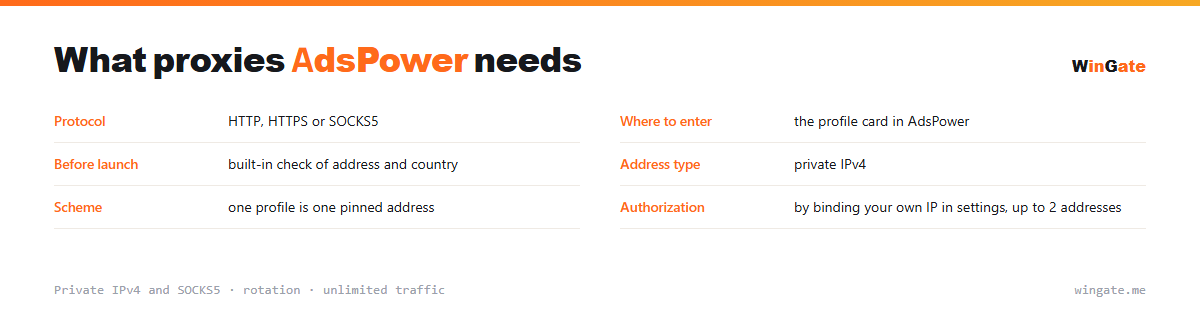
| Protocol | HTTP, HTTPS or SOCKS5 |
|---|---|
| Where to set it | the profile card in AdsPower |
| Before launch | built-in address and country check |
| Address type | private IPv4 |
| Setup | one pinned address per profile |
| Authorization | by binding your own IP in settings, up to 2 addresses |
How to check a proxy before launching an AdsPower profile
The program has a built-in proxy checker, which helps a lot when you work in batches. Before you launch a profile, you can see whether the address responds, which country it shows and how fast it is. Use it every time: dropping an address on an empty profile is cheaper than figuring out later why the account asked for ID verification.
Profiles here are often created in groups for similar tasks, so it is easier to assign addresses in advance, one per profile. With thousands of IPs in the pool, there is no need to save on addresses or put two profiles on one IP.
Check that the address responds and that its country suits the task. If an account was registered in one country and the IP points to another, the platform flags a location change and asks for ID verification after login, when it costs more to fix.
- Run the built-in check before you log in to an account in the profile
- Check the country and whether the address responds
- For a group of profiles, assign addresses in advance, one per profile
- Two profiles on one address get linked by the platform
How to connect proxies in AdsPower
To start, bind your IP in the settings, meaning the server or home computer where your proxy software runs. Without it, there is no connection. Two formats are available: the standard IP:PORT and IP:PORT:LOGIN:PASS for software with login and password fields.
In AdsPower, you set the address in the profile settings when you create it or through bulk import, and you can check the proxy right in the panel. Format IP:PORT, HTTP or SOCKS5.
Pin one address to each ad-account profile so you always log in from the same IP. The free test shows how the setup handles your workload (ad accounts, RPA, scraping) before you buy.
How to buy proxies for AdsPower
The process is simple. Sign up in the dashboard, request a free test of up to 2 hours, bind your IP and open a ticket with the operator to try AdsPower on your own tasks.
If everything works, choose a package by the number of addresses for your profiles and the term, pay in crypto, and access opens right after payment. You get one free test before you buy, and support replies in tickets.
FAQ
Will these proxies work with AdsPower?
AdsPower accepts HTTP, HTTPS and SOCKS5 proxies in IP:PORT format, which is the format we provide. The free test shows how well they suit multi-profile work and scraping.
Can I add addresses to all profiles at once?
In AdsPower, you load addresses as a list and spread them across profiles; how many you get depends on the package. New IPs come from the rotating pool.
Are they suitable for running accounts long-term?
For multi-profile scraping and automation, rotation works smoothly; to keep one account on one address long-term, people usually take a single address from the pool. The test shows how your workflow runs.
See also: buy proxies for Dolphin Anty, buy proxies for GoLogin, buy proxies for Multilogin, buy proxies for Octo Browser, buy proxies for multiaccounting, buy proxies for Telegram, buy proxies for Amazon, HTTP/HTTPS proxies, full catalog
© WinGate · source of the material · wingate.me/en/proxy/adspower-proxy