Proxies for multiaccounting
A pool of private IPv4 and SOCKS5 for dozens of profiles.
Proxy plans for multiaccounting
Every plan includes both IPv4 and SOCKS5.
Threads are simultaneous connections. The more threads, the higher the parallel load your software can handle.

Pool of 12,000-15,000 IPs
Address rotation
Unlimited traffic
Up to 1,000 threads

Pool of 12,000-15,000 IPs
Address rotation
Unlimited traffic
Up to 1,000 threads

Pool of 12,000-15,000 IPs
Address rotation
Unlimited traffic
Up to 1,000 threads

Pool of 12,000-15,000 IPs
Address rotation
Unlimited traffic
Up to 1,000 threads
Pool of 12,000-15,000 IPs
Address rotation
Unlimited traffic
Up to 3,000 threads
Pool of 12,000-15,000 IPs
Address rotation
Unlimited traffic
Up to 3,000 threads
Pool of 12,000-15,000 IPs
Address rotation
Unlimited traffic
Up to 3,000 threads
Pool of 12,000-15,000 IPs
Address rotation
Unlimited traffic
Up to 3,000 threads
Proxy catalog for your task
Why use proxies for multi-accounting
In multi-accounting you run dozens of profiles and accounts across different platforms. When all profiles run from one address, platforms link them together and limit them.
Platforms link accounts by matching signals, and the IP address is at the top of that list. Here a proxy works alongside an anti-detect browser: the browser separates fingerprints, and the pool gives every profile its own permanent IP.
Features of proxies for multiaccounting
Multi-accounting means running dozens or hundreds of accounts on one platform, and the main rule is simple: one account, one address. Otherwise the platform links the profiles and bans them all at once.
A pool of private addresses gives each profile its own IP and works with any antidetect browser: Dolphin Anty, AdsPower, GoLogin, Octo. For warm-up and keeping an account long term, use one address from the pool per profile; for sign-ups and mass actions, use rotation.
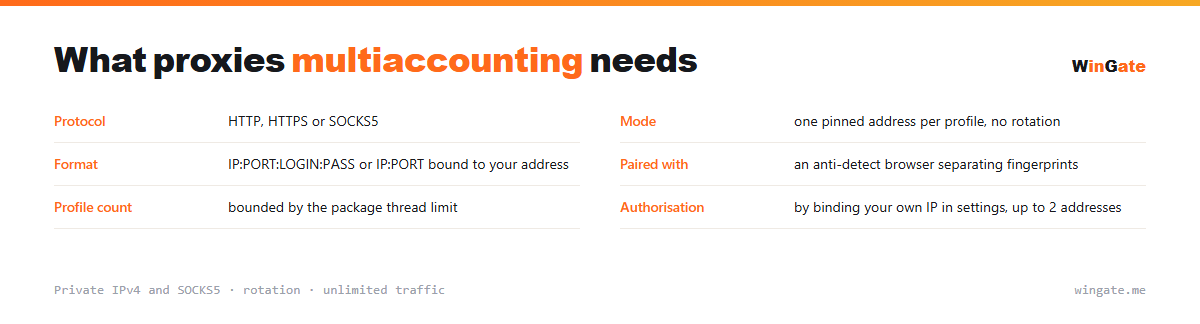
What proxies you need for multi-accounting
| Protocol | HTTP, HTTPS or SOCKS5 |
|---|---|
| Mode | one pinned address per profile, no rotation |
| Format | IP:PORT:LOGIN:PASS or IP:PORT bound to your address |
| Paired with | an anti-detect browser separating fingerprints |
| Profile count | up to the package thread limit |
| Authorization | by binding your own IP in settings, up to 2 addresses |
What links accounts and how proxies close that gap
A shared address is the most obvious signal, and there are others. Platforms also compare browser fingerprint, font sets, time zone, screen resolution and behaviour inside the session. A proxy covers only the first item; the rest is the job of the anti-detect browser, and the two only work together.
The second rule: keep the address the same. Each profile keeps one pinned IP for as long as it exists: an IP change mid-session looks like a hijacked account and triggers extra verification. So rotation, useful in data collection, works against you here.
Technically the IP:PORT:LOGIN:PASS format is easier, since it drops straight into the profile settings where those fields exist. Related cases are on the pages about social networks and airdrops.
- The IP is the most obvious link signal, and there are others
- The antidetect browser separates fingerprints, the proxy handles the IP
- One IP is pinned to each profile for as long as it exists
- The login and password format is saved with the profile
How to set up proxies for multiaccounting
To connect to the pool, go to the settings and bind the IP of the server or home computer where your proxy software runs. Without this binding the proxies will not work. There are two formats: the standard IP:PORT and IP:PORT:LOGIN:PASS for programs that need login and password fields.
The setup is the same in any antidetect browser: create a profile, enter our address in its settings (IP:PORT, HTTP or SOCKS5) and keep one profile on one IP. It is easy to spread the addresses across profiles as a list.
Before a mass launch, check the setup in the browser panel. The free test shows how many addresses you need for your accounts and which rotation fits, before you buy.
How to buy proxies for multiaccounting
The process is simple. Sign up in the dashboard, request a free test of up to 2 hours, bind your IP and open a ticket with the operator to test the setup on your own tasks.
If everything works, choose a package by volume and term, pay in crypto, and access opens right after payment. You get one free test before you buy, and support replies in tickets.
FAQ
Will these proxies work for multiaccounting?
For profile isolation, registration and automation, HTTP, HTTPS and SOCKS5 in IP:PORT format all work. The free test shows whether it fits your antidetect browser.
Are there enough addresses for dozens of profiles?
The rotating pool of 12,000-15,000 IPv4 gives each profile a different address; the number of threads depends on the package.
Are they good for running accounts long-term?
A pool with rotation suits registration, automation and checks, and for keeping one account long term you use a single address from the pool. Check this in advance and confirm it during the test.
See also: buy proxies for Dolphin Anty, buy proxies for AdsPower, buy proxies for GoLogin, buy proxies for Multilogin, buy proxies for Octo Browser, buy proxies for Telegram, buy proxies for Avito, buy proxies for Wildberries, full catalog
© WinGate · source of the material · wingate.me/en/proxy/multiaccounting-proxy