Proxies for GoLogin
A pool of private IPv4 and SOCKS5 for GoLogin profiles.
Proxy plans for GoLogin
Every plan includes both IPv4 and SOCKS5.
Threads are simultaneous connections. The more threads, the higher the parallel load your software can handle.

Pool of 12,000-15,000 IPs
Address rotation
Unlimited traffic
Up to 1,000 threads

Pool of 12,000-15,000 IPs
Address rotation
Unlimited traffic
Up to 1,000 threads

Pool of 12,000-15,000 IPs
Address rotation
Unlimited traffic
Up to 1,000 threads

Pool of 12,000-15,000 IPs
Address rotation
Unlimited traffic
Up to 1,000 threads
Pool of 12,000-15,000 IPs
Address rotation
Unlimited traffic
Up to 3,000 threads
Pool of 12,000-15,000 IPs
Address rotation
Unlimited traffic
Up to 3,000 threads
Pool of 12,000-15,000 IPs
Address rotation
Unlimited traffic
Up to 3,000 threads
Pool of 12,000-15,000 IPs
Address rotation
Unlimited traffic
Up to 3,000 threads
Proxy catalog for your task
Why use proxies for GoLogin
GoLogin is an antidetect browser that stores profiles in the cloud, each with its own fingerprints, cookies and network settings. Without separate addresses, all profiles connect from one IP, and platforms link them together.
Profiles are stored in the cloud and launch from different machines, so the physical location keeps changing. The outgoing IP has to stay the same no matter what, and that is exactly what the pool is for.
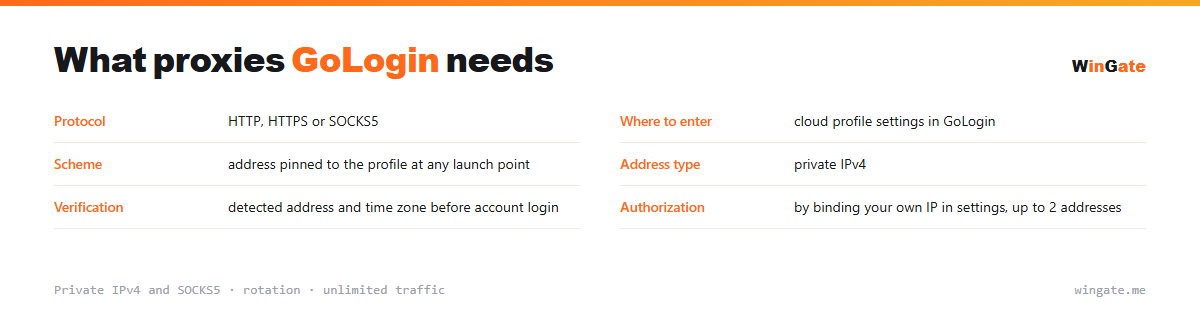
Features of proxies for GoLogin
GoLogin stores profiles in the cloud, and a team can open one profile from different devices. That is why a fixed address matters here: if the IP and location jump around, the platform flags a suspicious login.
You can pin one address from our pool to each profile; it works with the Orbita browser and supports HTTP and SOCKS5. For team work, operators rotate addresses from the pool across their profiles.
What proxies you need for GoLogin
| Protocol | HTTP, HTTPS or SOCKS5 |
|---|---|
| Where to set it | cloud profile settings in GoLogin |
| Setup | address pinned to the profile wherever it launches |
| Address type | private IPv4 |
| Verification | detected IP and time zone before you log into the account |
| Authorization | by binding your own IP in settings, up to 2 addresses |
Proxies in cloud GoLogin profiles
The defining feature here is that a profile sits in the cloud and opens from anywhere: an office machine, a laptop on a trip, someone else's computer. The account inside the profile does not notice any of this until the outgoing IP changes. As soon as it changes with the launch location, the platform sees a jump and asks for confirmation.
That makes the requirement stricter than in ordinary anti-detect work: the address is saved in the profile and stays the same on every launch. Then it does not matter which machine launches the browser: the site sees the same thing every time.
It is best to check the setup before you log into any account in the profile: open it, look at the detected IP and country, and make sure the time zone matches. If something does not line up, fixing it on an empty profile costs nothing.
- The address goes into the profile
- The launch location changes, the IP stays the same
- Verify the setup on an empty profile before logging in
- Check the profile time zone against the address country
How to connect proxies in GoLogin
Access opens once you bind your IP in the settings. That is the address of the server or home computer where your software runs; without it, nothing will connect. It comes in two formats: IP:PORT as the main one, and IP:PORT:LOGIN:PASS for programs with login and password fields.
In GoLogin, the proxy is set in the profile settings (Orbita browser): IP:PORT format, HTTP or SOCKS5. You can pin the address to a cloud profile, and it will load on any team member's device.
Check the connection in the panel before launch. You can try the best setup for cloud and team work (how many profiles, who uses which addresses) on the free test before buying.
How to buy proxies for GoLogin
The process is simple. Sign up in the dashboard, request a free test of up to 2 hours, bind your IP and open a ticket with an operator to check the setup with GoLogin on your own tasks.
If everything works, choose a package by the number of addresses for your profiles and the term, pay in crypto, and access opens right after payment. You can take the free test once, before you buy. If you have questions, open a ticket.
FAQ
Will these proxies work with GoLogin?
GoLogin accepts HTTP, HTTPS and SOCKS5 proxies in IP:PORT format, the same format we issue. The free test shows how well they suit multi-profile work and scraping.
Can I add addresses to all profiles at once?
In GoLogin addresses are loaded as a list and distributed across profiles; the volume depends on the package. New IPs come from the rotating pool.
Are they suitable for running accounts long-term?
For multi-profile scraping and automation, rotation works smoothly; to keep one account on one address long-term, people usually take a single address from the pool. The test shows how your workflow runs.
See also: buy proxies for Dolphin Anty, buy proxies for AdsPower, buy proxies for Multilogin, buy proxies for Octo Browser, buy proxies for multiaccounting, buy proxies for Telegram, buy proxies for eBay, buy proxies for Amazon, full catalog
© WinGate · source of the material · wingate.me/en/proxy/gologin-proxy