Rotating private IPv4 proxies
Rotation across the pool, private IPv4 and SOCKS5.
Rotating proxy plans
Every plan includes both IPv4 and SOCKS5.
Threads are simultaneous connections. The more threads, the higher the parallel load your software can handle.

Pool of 12,000-15,000 IPs
Address rotation
Unlimited traffic
Up to 1,000 threads

Pool of 12,000-15,000 IPs
Address rotation
Unlimited traffic
Up to 1,000 threads

Pool of 12,000-15,000 IPs
Address rotation
Unlimited traffic
Up to 1,000 threads

Pool of 12,000-15,000 IPs
Address rotation
Unlimited traffic
Up to 1,000 threads
Pool of 12,000-15,000 IPs
Address rotation
Unlimited traffic
Up to 3,000 threads
Pool of 12,000-15,000 IPs
Address rotation
Unlimited traffic
Up to 3,000 threads
Pool of 12,000-15,000 IPs
Address rotation
Unlimited traffic
Up to 3,000 threads
Pool of 12,000-15,000 IPs
Address rotation
Unlimited traffic
Up to 3,000 threads
Proxy catalog for your task
Why rotation matters
Rotation is useful wherever a task sends a lot of similar requests. When every thread goes through one address, the platform links them together and starts applying limits.
Rotation exists for one reason: to keep any single address below the request rate at which a platform stops responding. The list refreshes every 15 minutes, so new addresses keep coming into the job and the load is spread across thousands of IPs.
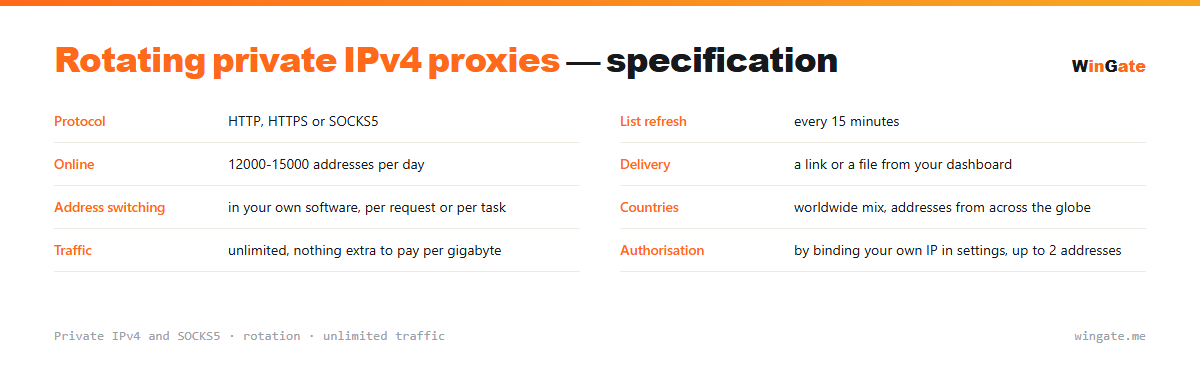
Features of rotating proxies
Rotation covers 12,000 to 15,000 private IPv4 addresses from various countries (worldmix). Your choice of IPv4 or SOCKS5, HTTP, HTTPS and SOCKS5 protocols, and unlimited traffic.
The list refreshes on our side, so there is nothing to switch on. Speed and low ping hold up under load, which keeps multi-threaded jobs from stalling.
How rotation works in the pool
| Protocol | HTTP, HTTPS or SOCKS5 |
|---|---|
| List refresh | every 15 minutes |
| Online | 12,000-15,000 IPs online daily |
| Delivery | a link or a file from your dashboard |
| Address switching | in your own software, per request or per task |
| Countries | worldwide mix of countries |
| Traffic | unlimited |
| Authorization | by binding your own IP in settings, up to 2 addresses |
How proxy rotation works in the pool
Here, rotation is built into the list itself: its addresses keep changing. Software that re-reads the list on a schedule keeps working with fresh addresses without stopping the job.
Switching addresses between requests happens on your side, and that is the right place for it, because only you know where it helps and where it hurts. Public data collection takes a new address on every request. Work behind a login is different: the account keeps one fixed IP, because a sudden IP change mid-session looks like the account has been hijacked.
Match the number of addresses to your threads. With 50 threads on 10 addresses, each IP carries five times the load and gets blocked first. Do it the other way round, with more addresses than threads, and you keep the overall pace without overloading any single IP.
Request timing matters as much as rotation itself. Intervals that are identical down to a fraction of a second look like automation even when every request comes from its own address, so randomize your pauses. The opposite happens too: unusually rare visits from an address that keeps changing look odd wherever a site expects a normal session.
- Per-request address switching happens in your software
- Rotation hurts behind a login, where you need a fixed IP
- Match the number of addresses to your threads
How to set up rotating proxies
To get access, bind the IP of the server or home computer where your proxy software runs (up to 2 addresses). Without that binding the proxy will not work in any format.
The main format is IP:PORT, and for programs with login and password fields there is also IP:PORT:LOGIN:PASS. You can try the pool on your own task during the free test of up to 2 hours.
How to buy rotating proxies
Sign up in the dashboard, request a free test of up to 2 hours, bind your IP and open a ticket with the operator to try the pool on your own tasks.
Once it suits you, pick a package by volume and term, pay in crypto, and access is activated automatically after the payment.
FAQ
How often do addresses change?
The pool runs in rotation, so requests are spread across 12,000 to 15,000 IPv4 addresses. The free test will show how this works on your own task.
Do I need to configure rotation in my software?
The list refreshes on our side every 15 minutes, so there is nothing to set up for that. Your software switches addresses from one request to the next by taking them from the list.
Does rotation work for sessions?
Work tied to a session needs one address from start to finish, and bulk requests are easier with rotation. You can try both scenarios on the free test.
See also: private proxies, IPv4 proxies, buy proxies for scraping, buy proxies for checkers, buy proxies for ZennoPoster, full catalog
© WinGate · source of the material · wingate.me/en/proxy/rotating-proxies