Bulk proxies
The whole private pool of 12,000-15,000 IPv4 in one package, for a day, a week or a month.
Bulk proxy plans
Every plan includes IPv4 and SOCKS5 together.
Threads are simultaneous connections. The more threads, the higher the parallel load your software can handle.

Pool of 12,000-15,000 IPs
Address rotation
Unlimited traffic
Up to 1,000 threads

Pool of 12,000-15,000 IPs
Address rotation
Unlimited traffic
Up to 1,000 threads

Pool of 12,000-15,000 IPs
Address rotation
Unlimited traffic
Up to 1,000 threads

Pool of 12,000-15,000 IPs
Address rotation
Unlimited traffic
Up to 1,000 threads
Pool of 12,000-15,000 IPs
Address rotation
Unlimited traffic
Up to 3,000 threads
Pool of 12,000-15,000 IPs
Address rotation
Unlimited traffic
Up to 3,000 threads
Pool of 12,000-15,000 IPs
Address rotation
Unlimited traffic
Up to 3,000 threads
Pool of 12,000-15,000 IPs
Address rotation
Unlimited traffic
Up to 3,000 threads
Proxy catalog for your task
What are bulk proxies
Most sellers price bulk proxies per address. You order a list of 100, 500 or 1,000 IPs, pay for each one and open a ticket every time a batch of them gets flagged. With a list like that, a few more addresses stop working every week.
WinGate packages work on a different principle. You buy access to the entire private pool for a fixed term: 12,000-15,000 IPv4 online per day, with HTTP, HTTPS and SOCKS5 in the same plan. The list refreshes every 15 minutes, so new addresses get into your rotation automatically and you never need to request replacements.
Two things set the price: the term and the number of threads. Addresses are not counted separately. Every package includes the full online list.
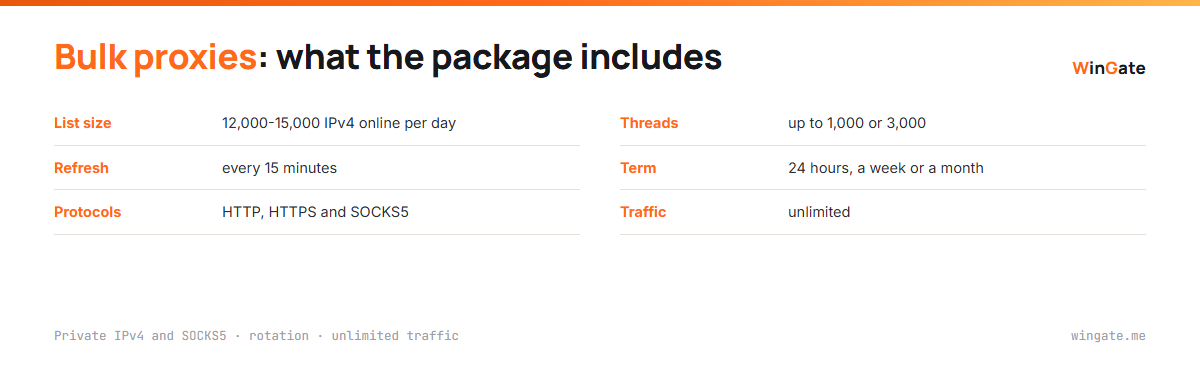
What is included in a bulk proxy package
All packages come from the same pool. They differ only in term and the number of simultaneous connections; everything else is the same.
What the plan includes
| List size | 12,000-15,000 private IPv4 online per day |
|---|---|
| Refresh | every 15 minutes, as a link or a file from the dashboard |
| Protocols | HTTP, HTTPS and SOCKS5 in one package |
| Threads | up to 1,000 or 3,000 simultaneous connections |
| Term | 24 hours, a week or a month |
| Traffic | unlimited |
| Format | IP:PORT with IP binding, or IP:PORT:LOGIN:PASS |
| Binding | up to 2 of your own IPs, changeable any time |
| Several packages | as many as you need, each with its own thread limit |
How many proxies to buy in bulk
Bulk buyers tend to think in units: "I need 300 proxies". Threads are a better way to count. A thread is one simultaneous connection from your software to the proxy, and it is the number that decides how many requests go out per minute.
Here is the math. A 1,000-thread package works across a list of 12,000 addresses, so each connection has about 12 addresses behind it. Each IP sends only occasional requests, so it is hard for a site to tell they all come from one scraper. A scraper running 300 threads gets an even bigger margin.
Once a job hits the 1,000 connection ceiling, move to the 3,000-thread plan. Separate projects are easier to run as several packages in one account. Each package has its own limit, so a heavy crawler never takes threads from a smaller task.
The free test of up to 2 hours shows how many threads your server and software can handle.
Bulk proxies for scraping, SEO and price monitoring
Bulk proxies pay off wherever you send many similar requests. Typical uses: web scraping of catalogs and marketplaces, rank tracking and keyword research for SEO, price monitoring and checking long lists.
In all of these the deciding factor is request frequency per address. While it stays low, the site serves a normal page. When one IP sends dozens of requests a minute, you start getting 429 Too Many Requests and captchas. A large list spreads the load across thousands of IPs, and none of them hits the limit.
The second scenario is running many profiles in antidetect browsers and automation in ZennoPoster or BAS. There each profile gets its own address from the list and keeps it for the whole session.
Working with a large list of IPv4 proxies
Even a large pool runs into blocks if your software sends requests to one site at perfectly even intervals. Sites look at request intervals, at headers and at how many different addresses share one browser fingerprint.
- Randomize delays in the task settings, with no fixed interval
- Cap threads per domain, especially on marketplaces
- Retry from a different address on a 403 or 429 response
With 12,000 addresses in the pool, a retry from another IP takes a fraction of a second. Before a large run, check the list with your scraper's built-in checker to see how many addresses respond from your server right now.
Common mistakes with bulk proxies
A large proxy list handles heavy load, but a few setup mistakes quickly lead to blocks. Each of them takes a couple of minutes to fix.
- Sending all of a task's threads to one site when a third would do
- A thousand requests share one User-Agent and an identical header set
- The software ignores the Retry-After header and retries a second later
- The list was exported once and sits in a file for a week
The last one is the most common. The list changes every 15 minutes, and a week-old file holds addresses that left the pool long ago. Pointing your software at the list link solves this with no manual work.
Run your pre-launch check against the target site. A checker that pings a search engine only shows that an address responds. A request to the real catalog page with a 5-10 second timeout shows how many addresses load the page your task needs.
How to set up bulk proxies
After payment the dashboard gives you a link to the current list and a file export. Long-running jobs should use the link. A-Parser and many other scrapers can reload the list on a schedule and pick up new addresses every 15 minutes.
Access works through IP binding. In the dashboard settings you enter the IP of the server or computer running your software, up to 2 addresses. The main format is IP:PORT, and IP:PORT:LOGIN:PASS is there for programs with login and password fields. Without binding, the proxies will not connect in either format.
How to buy bulk proxies
Sign up in the dashboard, request a free test of up to 2 hours and bind your IP. Open a ticket with the operator, and you get the list to try on your own tasks.
After the test, pick the term and the thread count. Payment is in cryptocurrency, and the package activates automatically right after the transaction.
FAQ
Can I buy 100 proxies?
Every package gives you access to the full list of 12,000-15,000 addresses. If your software needs 100, take the first 100 lines of the export and keep the rest in reserve.
How much do bulk proxies cost?
From $15 for 24 hours at 1,000 threads to $600 for a month at 3,000 threads. See all options in the pricing section above.
What if some proxies stop working?
No request is needed. The list refreshes every 15 minutes, and the fresh export is available at the same link.
Can I buy several packages?
Yes, one account can hold as many packages as you need, each with its own thread limit.
Do bulk proxies work with A-Parser and ZennoPoster?
Yes. Both accept a list in IP:PORT format, and A-Parser can reload the list from the link that refreshes every 15 minutes.
See also: proxy rental, rotating proxies, unlimited proxies, proxies for scraping, worldwide proxies, full catalog
© WinGate · source of the material · wingate.me/en/proxy/bulk-proxies