Proxies for Midjourney
A pool of private IPv4 and SOCKS5 for Midjourney.
Proxy plans for Midjourney
Every plan includes both IPv4 and SOCKS5.
Threads are simultaneous connections. The more threads, the higher the parallel load your software can handle.

Pool of 12,000-15,000 IPs
Address rotation
Unlimited traffic
Up to 1,000 threads

Pool of 12,000-15,000 IPs
Address rotation
Unlimited traffic
Up to 1,000 threads

Pool of 12,000-15,000 IPs
Address rotation
Unlimited traffic
Up to 1,000 threads

Pool of 12,000-15,000 IPs
Address rotation
Unlimited traffic
Up to 1,000 threads
Pool of 12,000-15,000 IPs
Address rotation
Unlimited traffic
Up to 3,000 threads
Pool of 12,000-15,000 IPs
Address rotation
Unlimited traffic
Up to 3,000 threads
Pool of 12,000-15,000 IPs
Address rotation
Unlimited traffic
Up to 3,000 threads
Pool of 12,000-15,000 IPs
Address rotation
Unlimited traffic
Up to 3,000 threads
Proxy catalog for your task
Why you need proxies for Midjourney
Midjourney is used via a bot and the API, often across several accounts with batch generation. When all requests come from one address, the service quickly rate-limits you.
Generation happens inside a chat platform, which means a persistent session behind a login. That is why the address has to stay pinned to the profile, or the platform treats an IP change as a hijacked account.
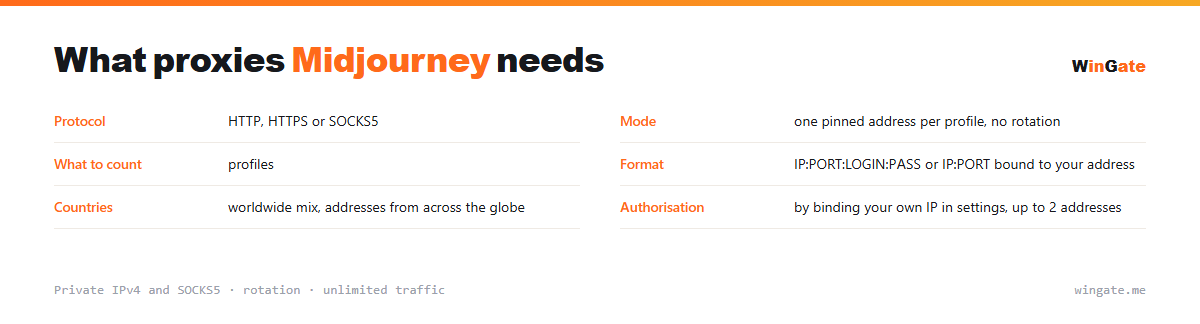
Features of proxies for Midjourney
Midjourney works through Discord and is not available everywhere, and several accounts from one IP are quickly linked and blocked by Discord. Parallel generation and multiple accounts each need their own address.
You get private IPv4 over HTTP, HTTPS or SOCKS5, as IP:PORT bound to your IP or as IP:PORT:LOGIN:PASS. Every profile gets its own address and keeps it, because switching IPs mid-session looks to the platform like a sign-in from another device.
What proxies you need for Midjourney
| Protocol | HTTP, HTTPS or SOCKS5 |
|---|---|
| Mode | one pinned address per profile, no rotation |
| What to count | profiles |
| Format | IP:PORT:LOGIN:PASS or IP:PORT bound to your address |
| Countries | worldwide mix of countries |
| Authorization | by binding your own IP in settings, up to 2 addresses |
Proxies for Midjourney: one address per profile
A chat platform keeps the connection open and ties an account to the IP it usually connects from. Switching IPs mid-session looks to it exactly like a sign-in from someone else's device, and the profile is sent for extra verification. So pin one address to each account and keep it.
Technically the IP:PORT:LOGIN:PASS format is easier: it suits browser profiles that have login and password fields. IP binding works too, but then access works only from the addresses entered in the dashboard: up to two, and you can change them as often as you like.
The number of addresses follows the number of profiles: the platform links accounts that connect from one IP. Related cases are on the page about AI services.
- The session is persistent, so pin one address per profile
- An IP change mid-session looks like someone else's device
- You need as many addresses as profiles
How to set up proxies for Midjourney
To use the pool, bind the IP of the machine that runs your proxy software (a server or a home PC) in the settings. No binding, no access. The main format is IP:PORT, plus IP:PORT:LOGIN:PASS for programs that require a login and password.
For Midjourney, set the proxy in the system settings or in the antidetect profile that runs Discord: IP:PORT format, HTTP or SOCKS5, one address per account.
Check the setup when you log into Discord. You can check connection stability for Midjourney on the free test.
How to buy proxies for Midjourney
The process is simple. Sign up in the dashboard, request a free test of up to 2 hours, bind your IP and open a ticket with the operator to test the setup on your own tasks.
Then just choose a plan by volume and term and pay in crypto; access opens right away. You can try the pool for free once before you buy. Write to support in a ticket if something does not connect.
FAQ
Will these proxies work for Midjourney?
For API work and multiple accounts, HTTP, HTTPS and SOCKS5 in IP:PORT format all work. The free test shows whether it fits.
How many accounts can the pool handle?
The number of parallel sessions and IP bindings depends on the package, and the pool of 12,000-15,000 IPv4 gives each account a different address.
Can I choose the address country?
You get a rotating pool of private IPv4 from networks around the world. The free test shows whether this fits your task.
See also: buy proxies for ChatGPT, buy proxies for AI, buy proxies for BAS, buy proxies for Selenium, buy proxies for Puppeteer, buy proxies for Python scripts, buy proxies for traffic arbitrage, buy proxies for mining, full catalog
© WinGate · source of the material · wingate.me/en/proxy/midjourney-proxy