Proxies for Puppeteer
Private addresses for browser automation in Puppeteer.
Proxy plans for Puppeteer
Every plan includes both IPv4 and SOCKS5.
Threads are simultaneous connections. The more threads, the higher the parallel load your software can handle.

Pool of 12,000-15,000 IPs
Address rotation
Unlimited traffic
Up to 1,000 threads

Pool of 12,000-15,000 IPs
Address rotation
Unlimited traffic
Up to 1,000 threads

Pool of 12,000-15,000 IPs
Address rotation
Unlimited traffic
Up to 1,000 threads

Pool of 12,000-15,000 IPs
Address rotation
Unlimited traffic
Up to 1,000 threads
Pool of 12,000-15,000 IPs
Address rotation
Unlimited traffic
Up to 3,000 threads
Pool of 12,000-15,000 IPs
Address rotation
Unlimited traffic
Up to 3,000 threads
Pool of 12,000-15,000 IPs
Address rotation
Unlimited traffic
Up to 3,000 threads
Pool of 12,000-15,000 IPs
Address rotation
Unlimited traffic
Up to 3,000 threads
Proxy catalog for your task
Why Puppeteer needs proxies
Puppeteer drives a headless Chromium browser for automation and scraping. Parallel instances from one address quickly hit captchas and limits.
Puppeteer drives a real browser, so the proxy is set the same way it is in Chrome itself, through a launch argument. That brings its own quirk: the address applies to the whole instance, so several IPs mean several contexts.
Features of proxies for Puppeteer
Puppeteer drives headless Chrome from Node.js, and when launching many pages each instance must run from its own address. Otherwise the site links automated sessions by IP.
You get private IPv4 over HTTP, HTTPS or SOCKS5, as IP:PORT bound to your IP or as IP:PORT:LOGIN:PASS. Binding your own IP solves this, since the browser launch argument cannot pass a login and password.
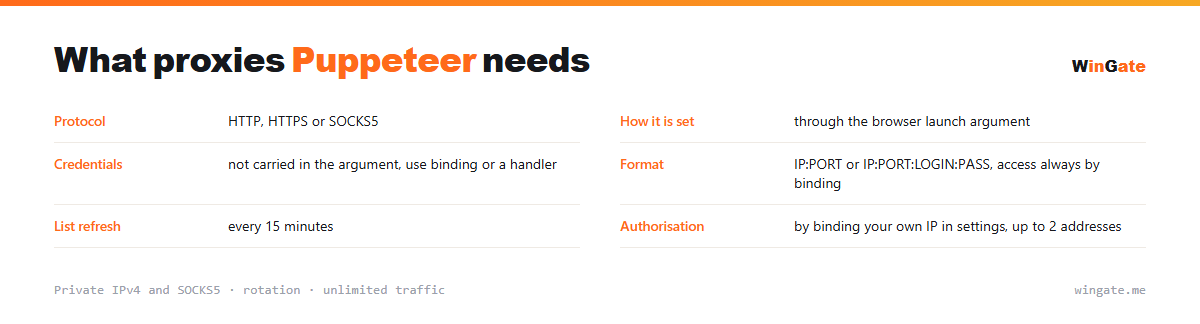
What proxies you need for Puppeteer
| Protocol | HTTP, HTTPS or SOCKS5 |
|---|---|
| How to set it | through the browser launch argument |
| Credentials | cannot be passed in the argument, use binding or a handler |
| Format | IP:PORT or IP:PORT:LOGIN:PASS, access via IP binding only |
| List refresh | every 15 minutes |
| Authorization | by binding your own IP in settings, up to 2 addresses |
Setting a proxy in Puppeteer and handling credentials
Almost everyone trips on this one. Two ways out: hand the credentials over separately through a page-level authentication handler, or avoid needing them at all.
The second route usually turns out simpler. Enter your own IP in the dashboard settings to enable binding, and the launch argument only needs the address and port. You can bind up to two of your own addresses, change them without limits, and activation takes around 5 minutes.
The third place people lose time is name resolution. By default a hostname may be resolved on your own machine, and then the query stays visible to your provider even though the traffic itself goes through the proxy. Where that matters, use the scheme in which the proxy resolves the name. Selenium has the same pitfall, covered on its own page.
- Chrome ignores credentials inside the launch argument
- Binding your own IP is required anyway and makes credentials unnecessary
- The address applies to the browser instance
- Several IPs mean several contexts or instances
How to connect proxies in Puppeteer
To use the pool, bind the IP of the machine that runs your proxy software (a server or a home PC) in the settings. No binding, no access. The main format is IP:PORT, plus IP:PORT:LOGIN:PASS for programs that require a login and password.
In Puppeteer the proxy is passed in args at launch (--proxy-server=IP:PORT), with authorization via page.authenticate. Format IP:PORT, HTTP or SOCKS5.
Test the setup on a couple of instances first. The free test will show how many addresses you need for the number of browsers you run in parallel.
How to buy proxies for Puppeteer
The process is simple. Sign up in the dashboard, request a free test of up to 2 hours, bind your IP and message support through a ticket to check the setup with Puppeteer on your own tasks.
If everything works, choose a package by thread count and term, pay in crypto, and access opens right after payment. The free test runs once, before you pay. Support answers in tickets.
FAQ
Will these proxies work with Puppeteer?
Puppeteer accepts a proxy via a launch argument in HTTP, HTTPS and SOCKS5, with authorization through page.authenticate. The free test shows whether it fits.
How many instances can I run?
The number of parallel instances and bound IPs depends on the package, and the pool of 12,000-15,000 IPv4 addresses gives sessions different IPs.
Which protocol should I choose, HTTP or SOCKS5?
For most Puppeteer scenarios either one works; SOCKS5 is better for non-standard connections. You can check both during the free test.
See also: buy proxies for BAS, buy proxies for Selenium, buy proxies for Python scripts, buy proxies for ZennoPoster, buy proxies for AMS Enterprise, buy proxies for A-Parser, buy proxies for AI, buy proxies for ChatGPT, full catalog
© WinGate · source of the material · wingate.me/en/proxy/puppeteer-proxy