Proxies paid with cryptocurrency
Pay in crypto, access opens once it clears.
Plans for proxies paid in crypto
Every plan includes both IPv4 and SOCKS5.
Threads are simultaneous connections. The more threads, the higher the parallel load your software can handle.

Pool of 12,000-15,000 IPs
Address rotation
Unlimited traffic
Up to 1,000 threads

Pool of 12,000-15,000 IPs
Address rotation
Unlimited traffic
Up to 1,000 threads

Pool of 12,000-15,000 IPs
Address rotation
Unlimited traffic
Up to 1,000 threads

Pool of 12,000-15,000 IPs
Address rotation
Unlimited traffic
Up to 1,000 threads
Pool of 12,000-15,000 IPs
Address rotation
Unlimited traffic
Up to 3,000 threads
Pool of 12,000-15,000 IPs
Address rotation
Unlimited traffic
Up to 3,000 threads
Pool of 12,000-15,000 IPs
Address rotation
Unlimited traffic
Up to 3,000 threads
Pool of 12,000-15,000 IPs
Address rotation
Unlimited traffic
Up to 3,000 threads
Proxy catalog for your task
Why pay for proxies in crypto
Paying in cryptocurrency needs no card on file and no extra details, and the payment goes through directly. For ongoing work, it is the simplest way to top up.
Paying in crypto is convenient: you need no card and no bank account, and access opens automatically as soon as the payment clears on the network. No forms to fill out and no manual review to wait for.
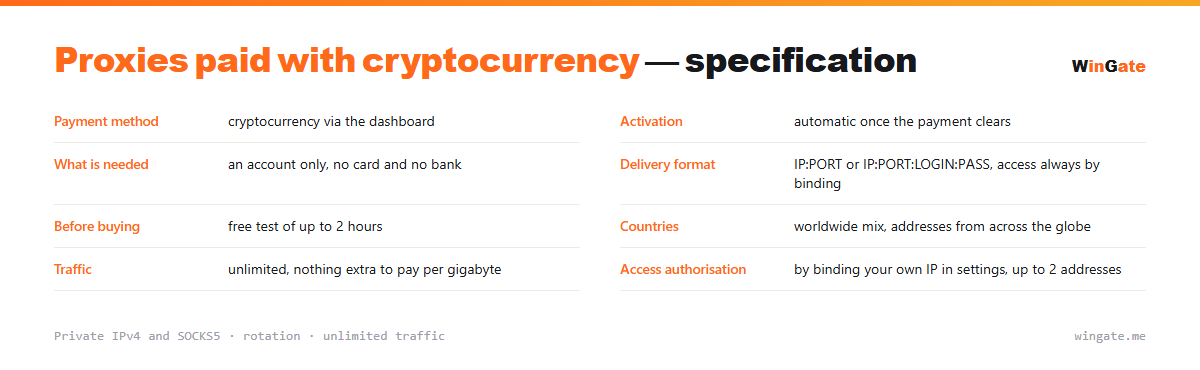
How crypto payment works here
Packages are paid in cryptocurrency, and no other payment method is offered. Plans cover a range of volumes and terms, from the smallest package to a pool for 3,000 threads.
After payment you get the same private pool: 12,000 to 15,000 rotating IPv4 from a mix of countries (worldmix), IPv4 or SOCKS5 to choose from, and unlimited traffic.
How crypto payment works
| Payment method | cryptocurrency via the dashboard |
|---|---|
| Activation | automatic once the payment clears |
| What you need | just an account, no card or bank needed |
| Delivery format | IP:PORT or IP:PORT:LOGIN:PASS, access via IP binding only |
| Before buying | free test of up to 2 hours |
| Countries | worldwide mix of countries |
| Traffic | unlimited |
| Access authorization | by binding your own IP in settings, up to 2 addresses |
Paying for proxies in crypto and when access opens
The sequence is simple and stays entirely inside the dashboard. You pick a top-up amount and a payment option, send the funds, and once the payment is confirmed your balance is credited. From there the package activates automatically, with no manual processing to wait for.
The only delay comes from the network: confirmation time depends on network load and the fee you chose. Once the payment goes through, access opens.
Your balance is kept in the dashboard separately from your packages, so you can extend a term or add volume right there without going through an operator. One balance can cover any number of packages, and each has its own thread limit.
Once the package activates, access is the last step. Enter your own IP in the dashboard settings to bind it, and the list starts working from that IP in about 5 minutes. You can bind up to two addresses and change them as often as you like; if you work from two machines, the threads are split between them.
- All you need is an account; payment is in crypto
- Access activates automatically once the payment clears
- Any delay comes from network confirmation
- One balance can cover any number of packages, each with its own thread limit
How to set up proxies after payment
To get access, bind the IP of the server or home computer where your proxy software runs (up to 2 addresses). Without that binding the proxy will not work in any format.
The main format is IP:PORT, and for programs with login and password fields there is also IP:PORT:LOGIN:PASS. You can try the pool on your own task during the free test of up to 2 hours.
How to pay for proxies in crypto
Sign up in the dashboard, request a free test of up to 2 hours, bind your IP and open a ticket with the operator to try the pool on your own tasks.
Pick a package for your volume and term, complete the crypto payment, and the proxies become available as soon as it clears.
FAQ
What payment methods do you accept?
We accept payment in cryptocurrency only; there are no other options. Access opens once the payment clears.
When does access open after payment?
Activation happens automatically once the payment clears, with no separate confirmation to wait for.
Can I try the service before paying?
Before you buy, you can take a free test of up to 2 hours on the same private pool. You request it in your dashboard.
See also: proxy rental, private proxies, proxies with a free test, IPv4 proxies, buy proxies for traffic arbitrage, full catalog
© WinGate · source of the material · wingate.me/en/proxy/crypto-payment-proxies