Proxies for Xrumer
Private addresses for mass posting and link building in Xrumer.
Proxy plans for Xrumer
Every plan includes both IPv4 and SOCKS5.
Threads are simultaneous connections. The more threads, the higher the parallel load your software can handle.

Pool of 12,000-15,000 IPs
Address rotation
Unlimited traffic
Up to 1,000 threads

Pool of 12,000-15,000 IPs
Address rotation
Unlimited traffic
Up to 1,000 threads

Pool of 12,000-15,000 IPs
Address rotation
Unlimited traffic
Up to 1,000 threads

Pool of 12,000-15,000 IPs
Address rotation
Unlimited traffic
Up to 1,000 threads
Pool of 12,000-15,000 IPs
Address rotation
Unlimited traffic
Up to 3,000 threads
Pool of 12,000-15,000 IPs
Address rotation
Unlimited traffic
Up to 3,000 threads
Pool of 12,000-15,000 IPs
Address rotation
Unlimited traffic
Up to 3,000 threads
Pool of 12,000-15,000 IPs
Address rotation
Unlimited traffic
Up to 3,000 threads
Proxy catalog for your task
Why you need proxies for Xrumer
Xrumer automates registration and posting on sites in several threads. When all threads run from one address, sites respond with captchas and slow you down.
The program runs across many threads, and you need as many addresses as there are threads. A pool of thousands of IPs handles that without any tuning: threads do not share an IP or get in each other's way.
Features of proxies for Xrumer
XRumer mass-posts to forums and sites across many threads, and without a proxy pool, sign-ups and posting from one IP hit limits and captchas almost at once. Each thread must run from its own address.
You get private IPv4 over HTTP, HTTPS or SOCKS5, as IP:PORT bound to your IP or as IP:PORT:LOGIN:PASS. Bulk posting is spread across addresses so that no single IP gets too many requests, and the list refreshes every 15 minutes.
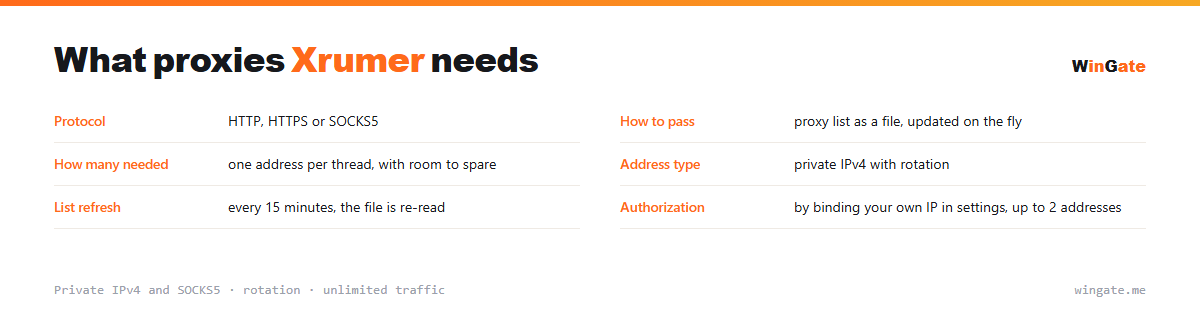
What proxies you need for XRumer
| Protocol | HTTP, HTTPS or SOCKS5 |
|---|---|
| How to load | proxy list as a file, updated on the fly |
| How many you need | one address per thread, with room to spare |
| Address type | private IPv4 with rotation |
| List refresh | every 15 minutes, the file is reloaded |
| Authorization | by binding your own IP in settings, up to 2 addresses |
How to assign proxies to XRumer threads
The software can take a proxy list from a file and pick up its updates as it runs.
Work out the number of addresses from your thread count. With fifty threads and ten addresses, each IP carries five times the load and is the first to hit limits. With more addresses than threads, you keep the pace without raising the request rate on any single IP.
One more detail for forums and boards: sites remember an address's history. Coming back to the same site from the same IP leaves a recognizable trail, so split addresses across threads and across groups of target sites.
- The address list is picked up from a file and updated on the fly
- Address count is calculated from threads
- Split addresses across groups of sites too, so you do not leave a trail
- Run the list check before the job starts
How to set up proxies for Xrumer
To connect to the pool, go to the settings and bind the IP of the server or home computer where your proxy software runs. Without this binding the proxies will not work. There are two formats: the standard IP:PORT and IP:PORT:LOGIN:PASS for programs that need login and password fields.
In XRumer, you load proxies in the proxy settings as an IP:PORT list, HTTP or SOCKS5, often alongside XEvil for captcha solving.
There is a proxy check before launch. The free test shows how many addresses your thread count needs.
How to buy proxies for Xrumer
The process is simple. Sign up in the dashboard, request a free test of up to 2 hours, bind your IP and open a ticket with the operator to check the setup for Xrumer on your own tasks.
If everything works, choose a package by volume and term, pay in crypto, and access opens right after payment. You get one free test before you buy, and support replies in tickets.
FAQ
Will these proxies work with Xrumer?
Xrumer accepts HTTP, HTTPS and SOCKS5 proxies as a list in IP:PORT format, the same format we provide. The free test shows what fits your thread count.
How many threads can I run?
The number of threads and bindings depends on the package, and the pool of 12,000-15,000 IPv4 gives threads different addresses.
Which protocol should I choose, HTTP or SOCKS5?
Both work for most scenarios; SOCKS5 is handier for non-standard connections. You can check both during the free test.
See also: buy proxies for SEO, buy proxies for SEO software and automation, buy proxies for GSA Search Engine Ranker, buy proxies for Doorway Generator, buy proxies for Google, buy proxies for Yandex, buy proxies for scraping, buy proxies for ZennoPoster, full catalog
© WinGate · source of the material · wingate.me/en/proxy/xrumer-proxy