Proxies for Google
Private proxies for Google.
Proxy plans for Google
Every plan includes both IPv4 and SOCKS5.
Threads are simultaneous connections. The more threads, the higher the parallel load your software can handle.

Pool of 12,000-15,000 IPs
Address rotation
Unlimited traffic
Up to 1,000 threads

Pool of 12,000-15,000 IPs
Address rotation
Unlimited traffic
Up to 1,000 threads

Pool of 12,000-15,000 IPs
Address rotation
Unlimited traffic
Up to 1,000 threads

Pool of 12,000-15,000 IPs
Address rotation
Unlimited traffic
Up to 1,000 threads
Pool of 12,000-15,000 IPs
Address rotation
Unlimited traffic
Up to 3,000 threads
Pool of 12,000-15,000 IPs
Address rotation
Unlimited traffic
Up to 3,000 threads
Pool of 12,000-15,000 IPs
Address rotation
Unlimited traffic
Up to 3,000 threads
Pool of 12,000-15,000 IPs
Address rotation
Unlimited traffic
Up to 3,000 threads
Proxy catalog for your task
Why you need proxies for Google
For SEO, people collect rankings, suggestions and SERPs from Google. With mass queries from one address, the search engine soon asks for a captcha and scraping stops.
Google shows a verification page to a busy IP after just a handful of quick queries, and a rank tracker does exactly that: it polls the same keywords on a schedule. A pool spreads the series across different IPs so no single one reaches that rate.
Features of proxies for Google
Google is the toughest on automated queries: after a few dozen requests from one IP, you start getting a captcha. Scraping results, checking rankings and collecting suggestions need a rotating pool, with each query sent from a new address.
You get private IPv4 over HTTP, HTTPS or SOCKS5, as IP:PORT bound to your IP or as IP:PORT:LOGIN:PASS, with 12,000-15,000 IPs online per day. Query volume is spread across the pool, and the number of addresses follows the number of concurrent threads in your tool.
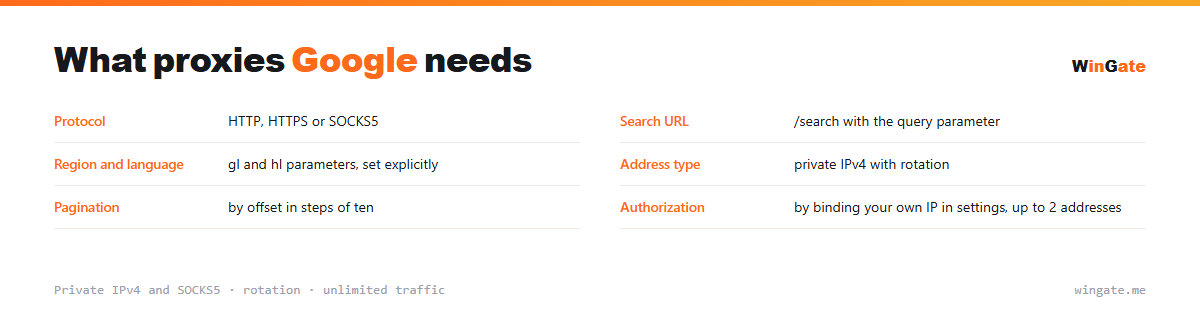
What proxies you need for Google
| Protocol | HTTP, HTTPS or SOCKS5 |
|---|---|
| Search URL | /search with the query parameter |
| Region and language | gl and hl parameters, set explicitly |
| Address type | private IPv4 with rotation |
| Pagination | by offset in steps of ten |
| Authorization | by binding your own IP in settings, up to 2 addresses |
What to keep in mind when scraping Google results
Search is at /search, and the query itself goes in the q parameter. Country and language are set by gl and hl, and that is no small thing: they decide which set of results you get. Set them explicitly, so Google does not guess the region from the IP.
Pagination works by an offset in steps of ten, so the second page is an offset of ten and the third an offset of twenty. The results page stopped being a flat list long ago: next to organic results you get ad blocks, a featured snippet, related questions, a local pack with a map, and video carousels.
Hence the classic rank-tracking mistake: counting ads as organic results. Ads look much like ordinary results, and failing to separate them skews the whole report. Google changes its layout classes regularly, so tie your parser to stable block containers and re-check it on a schedule, before scraping breaks.
- Country and language are set by parameters
- The offset moves in steps of ten positions
- Separate ads from organic results, or your rankings report will be skewed
- Personalisation skews results; an IP in the target region gives a neutral view
How to set up proxies for Google
To connect to the pool, go to the settings and bind the IP of the server or home computer where your proxy software runs. Without this binding the proxies will not work. There are two formats: the standard IP:PORT and IP:PORT:LOGIN:PASS for programs that need login and password fields.
In Google SERP scrapers (A-Parser, Key Collector, Netpeak, etc.), proxies are loaded as a list in IP:PORT format, HTTP or SOCKS5, and spread across query threads.
Before scraping, check the list with the built-in proxy checker. The free test shows how many addresses you need for your Google query volume before you buy.
How to buy proxies for Google
The process is simple. Sign up in the dashboard, request a free test of up to 2 hours, bind your IP and open a ticket with an operator to check the setup for Google on your own tasks.
If everything works, choose a package by volume and term, pay in crypto, and access opens right after payment. You get one free test before you buy, and support replies in tickets.
FAQ
Will these proxies work for scraping Google?
For collecting rankings and suggestions, HTTP, HTTPS and SOCKS5 in IP:PORT format all work, with addresses rotating on every query. The free test shows whether it fits.
Do I need a captcha-solving service?
For mass scraping, proxies paired with a captcha-solving service run noticeably smoother; the service is connected separately. The test shows how your scraping runs.
Are there enough addresses for large-scale scraping?
The pool of 12,000-15,000 IPv4 with rotation provides new addresses for frequent queries; the number of threads depends on the package.
See also: buy proxies for SEO, buy proxies for SEO software and automation, buy proxies for Xrumer, buy proxies for GSA Search Engine Ranker, buy proxies for Doorway Generator, buy proxies for Yandex, buy proxies for CapMonster, buy proxies for Wildberries, full catalog
© WinGate · source of the material · wingate.me/en/proxy/google-proxy