Proxies for email campaigns
Private proxies for email campaigns and mailing software.
Proxy plans for email campaigns
Every plan includes both IPv4 and SOCKS5.
Threads are simultaneous connections. The more threads, the higher the parallel load your software can handle.

Pool of 12,000-15,000 IPs
Address rotation
Unlimited traffic
Up to 1,000 threads

Pool of 12,000-15,000 IPs
Address rotation
Unlimited traffic
Up to 1,000 threads

Pool of 12,000-15,000 IPs
Address rotation
Unlimited traffic
Up to 1,000 threads

Pool of 12,000-15,000 IPs
Address rotation
Unlimited traffic
Up to 1,000 threads
Pool of 12,000-15,000 IPs
Address rotation
Unlimited traffic
Up to 3,000 threads
Pool of 12,000-15,000 IPs
Address rotation
Unlimited traffic
Up to 3,000 threads
Pool of 12,000-15,000 IPs
Address rotation
Unlimited traffic
Up to 3,000 threads
Pool of 12,000-15,000 IPs
Address rotation
Unlimited traffic
Up to 3,000 threads
Proxy catalog for your task
Why you need proxies for email campaigns
Working with mail at volume means registering and checking mailboxes and sending through software. When everything comes from one address, services quickly impose limits.
Sending runs into two limits: how many messages one address can send in a given time, and whether outbound port 25 is open at all. The first is handled by spreading delivery across the pool, the second by the fact that every port here is open.
Features of proxies for email campaigns
When you register and check mailboxes in bulk, services quickly put limits on the IP, and sending from one address hurts deliverability. A separate address per thread keeps mail work steady.
You get private IPv4 over SOCKS5, as IP:PORT bound to your IP or as IP:PORT:LOGIN:PASS, with all ports open, including 25. Sending is spread across addresses, and the number of IPs follows the number of concurrent threads in your mailer.
What proxies you need for email campaigns
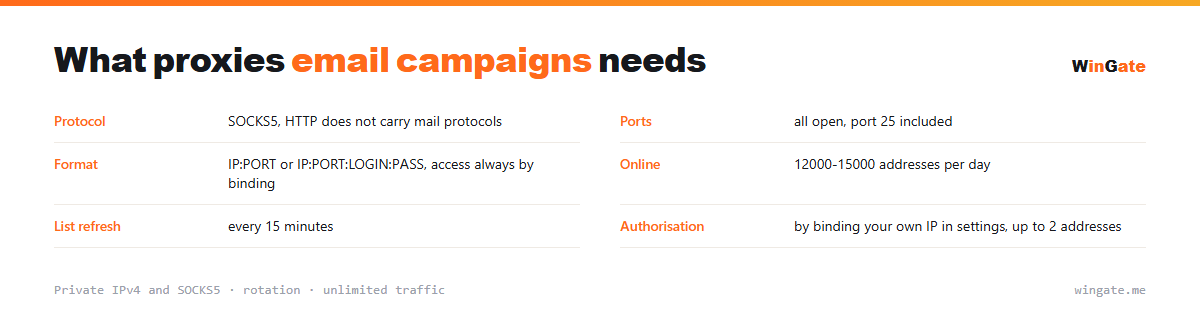
| Protocol | SOCKS5 (HTTP does not carry mail protocols) |
|---|---|
| Ports | all open, port 25 included |
| Format | IP:PORT or IP:PORT:LOGIN:PASS, access via IP binding only |
| Online | 12,000-15,000 IPs online daily |
| List refresh | every 15 minutes |
| Authorization | by binding your own IP in settings, up to 2 addresses |
Setting up proxies for email campaigns: port and pace
Start with the port. Many providers and a fair number of proxy services close outbound port 25, and mail software then hangs until it times out while trying to hand the message to the recipient's MX server. All ports are open here, including 25, so the setup works without workarounds.
The protocol is almost always SOCKS5, because an HTTP proxy understands web requests only and mail protocols will not pass through it. Pick the proxy format to match your software: if the program has login and password fields, use IP:PORT:LOGIN:PASS, and if it doesn't, bind your own IP in the dashboard settings.
Pace matters more than address count. Receiving servers look at the sending rhythm as much as at volume: a hundred messages a minute from one IP looks like a campaign, and the same hundred spread across the pool with varied pauses looks like ordinary traffic. Match the number of addresses to your concurrent threads, and remember that the thread limit is set per package and does not add up across packages. The same logic applies to work in social networks, where a steady pace matters more than speed.
- Port 25 is open, no workarounds required
- Mail protocols need SOCKS5: HTTP will not carry them
- Sending pace matters more than total address count
- Each package comes with its own thread limit
How to set up proxies for email campaigns
To connect to the pool, go to the settings and bind the IP of the server or home computer where your proxy software runs. Without this binding the proxies will not work. There are two formats: the standard IP:PORT and IP:PORT:LOGIN:PASS for programs that need login and password fields.
For mail work, proxies are loaded as a list into your registration or checking software or a script (IP:PORT format, HTTP or SOCKS5) and spread across threads.
Test the setup on a small volume first. The free test shows how many addresses you need for your sending pace.
How to buy proxies for email campaigns
The process is simple. Sign up in the dashboard, request a free test of up to 2 hours, bind your IP and open a ticket with an operator to check the setup for email campaigns on your own tasks.
If everything works, choose a package by volume and term, pay in crypto, and access opens right after payment. You can try the pool for free once before you buy. Write to support in a ticket if something does not connect.
FAQ
Will these proxies work for email?
For registering, checking and working with mailboxes, HTTP, HTTPS and SOCKS5 in IP:PORT format all work. The free test shows whether it fits.
How many threads can I run?
The number of threads and IP bindings depends on the package, and the pool of 12,000-15,000 IPv4 gives each session a different address.
Which protocol should I choose, HTTP or SOCKS5?
Both work for most tasks; SOCKS5 is handier for non-standard connections. You can check both during the free test.
See also: proxies for traffic arbitrage, proxies for trading, proxies for mining, proxies for airdrops, proxies for Telegram, proxies for Instagram, proxies for anti-captcha and checkers, proxies for VK, full catalog
© WinGate · source of the material · wingate.me/en/proxy/email-proxy